Your passwords.
Only yours.

The zero-knowledge password manager that encrypts everything on your device before it ever leaves.


Zero-knowledge AES-256 encrypted Free to start

Why IronCrypto?

Secure sharing

Share passwords and files with family and friends using RSA encryption. Only the recipient can decrypt.

End-to-end encrypted

Your data is encrypted on your device with your master password using AES-256. We never see your passwords.

Works everywhere

Available on iOS, Android, and any web browser. Your passwords are always within reach.

Free to start

Core password management is free forever. Pro plan available for documents and more.

See it in action

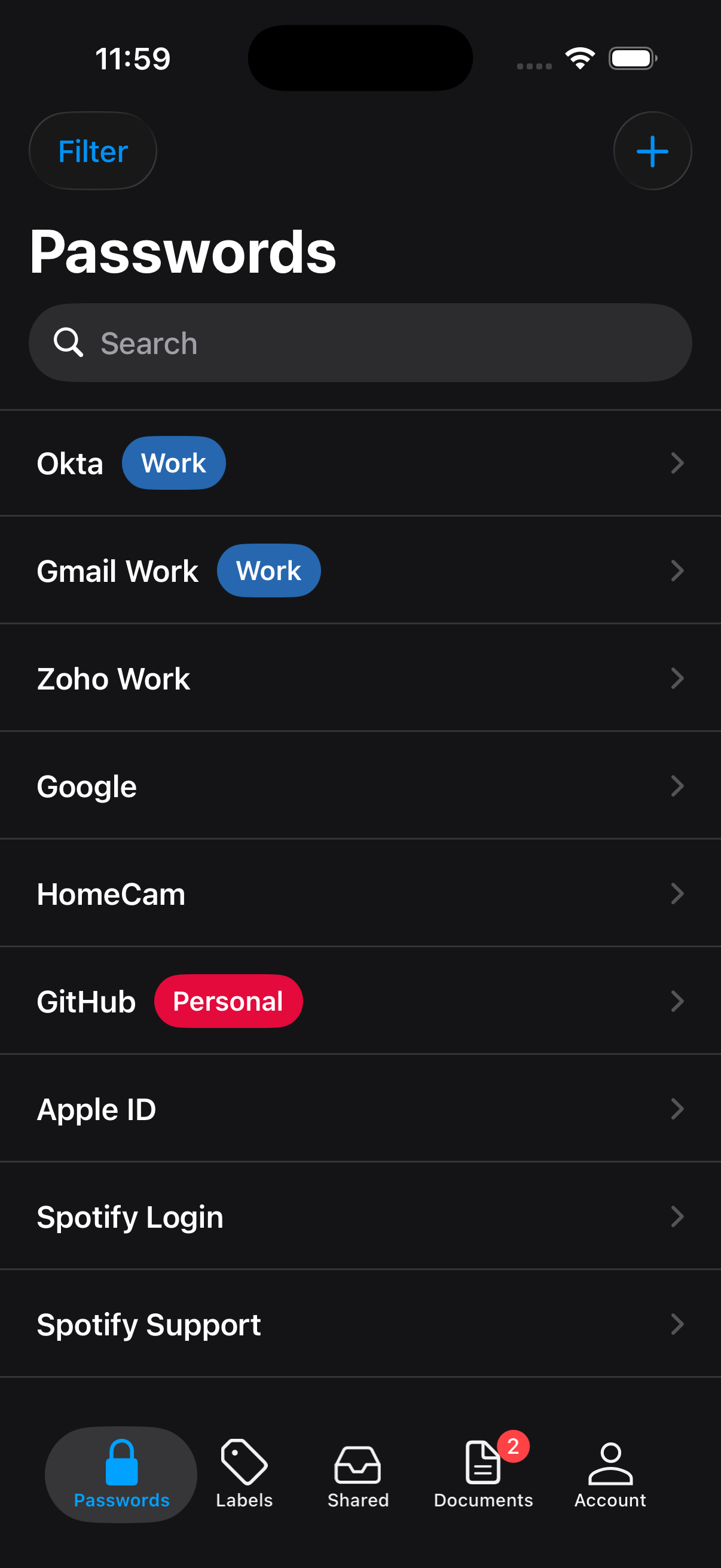
A clean, simple interface across all your devices.

IronCrypto passwords list
IronCrypto on all devices

How it works

1

Sign in

Use your Google or Apple account. This acts as two-factor authentication.

2

Create a master password

This password never leaves your device. It’s the key to encrypting all your data.

3

You’re protected

Store, access, and share passwords across all your devices for free.

Get the app

All you need is any browser or a device with the IronCrypto app.
Frequently asked questions

All your data stored using that password will be completely inaccessible, so make sure you always remember it.
IronCrypto uses AES 256 in Counter mode of operation directly on your browser to encrypt your passwords and get the cipher key (using plain password as source for key expansion).
By encrypting everything on your browser/device and never sending your master password to our servers, we can ensure that your data is always encrypted and nobody, including us, can decrypt it. Even in the unlikely event of a breach to our servers, your data would remain securely encrypted to anyone that does not know your master password.
Users also need to have a google or apple account, which will act as a form of two factor authentication. For somebody to access your passwords, they would first need to hack your google/apple account, for which you may have separate two factor authentication, and then they would need to know your master password.
You can delete your account by clicking on the delete button in the account page. This will delete all your data from our servers and you will not be able to recover it.
Welcome to IronCrypto

Create a master password to access IronCrypto. Your master password never gets transmitted to IronCrypto, so if you forget it you will lose your data.

Forceable in less than one second 

Clicking submit means that you agree to IronCrypto's Terms and Conditions.

Welcome to IronCrypto

Log in with your master password to access your data. Your master password never gets transmitted to IronCrypto, so if you forget it you will lose your data.

Upload Document

Drag & Drop your file here

or click to select a file

PDF, JPG, PNG, DOC, DOCX • up to 100 MB per file.
Encrypting & Uploading…
IronCrypto Pro
IronCrypto Pro
Upgrade for a bigger, private vault
  • Encrypted Zero‑knowledge encryption — files are encrypted on your device with your master password. We can’t see them.
  • File size Upload documents up to 100 MB each.
  • Total storage Enjoy up to 10 GB total encrypted storage in your vault.
  • Experience A polished Pro experience that we’ll keep improving over time.

Payments are processed securely by Stripe. Your card details never touch our servers.

Add Password
user2@example.com

Last updated Last updated: --/--/----
Share Password

Share this password with another IronCrypto user.

Recent:

Add Label
Shared Items
You have not shared any items yet.
About IronCrypto

IronCrypto is a secure online password manager. IronCrypto uses Google accounts for authentication and Google server(s) for hosting your encrypted data. Once you have signed in with Google, you will be asked to create a master password to access IronCrypto. All your data will be encrypted with your master password on your browser before it gets sent to us. You are not required to disclose your master password to anyone, including the server(s) where IronCrypto is hosted. Neither IronCrypto nor Google can view your data because neither of them have access to your master password. With the ability to create your own labels, you can keep your data organized and easy to find.


General FAQs
What happens if I forget my master password?
All your data stored using that password will be completely inaccessible, so please make sure you always remember it.

How does IronCrypto encrypt my data?
IronCrypto uses AES directly on your browser to encrypt your passwords and get the cipher key (using plain password as source for key expansion). It uses AES in Counter mode of operation.

Why encrypt and decrypt my data on the browser?
By encrypting/decrypting your data on the browser instead of doing it on the server, we eliminate the possibility of your private data being taken from our servers.

Why is Google Authentication Required?
We ask all our users to sign in with their Google accounts first, so as to validate the existence of the user and minimize the registration of bots or illegitimate users.

How can I import/export my passwords?
These features are only available on our website at ironcrypto.com. Go on the account page on the sidebar and click on the import/export button.

What if my question is not on this list?
You can contact us with any question at info@ironcrypto.com

Credits

Globe Image Map vector created by freepik - www.freepik.com

Edit Profile

Update your username below.

Change Master Password

Change your master password to access IronCrypto. Your master password never gets transmitted to IronCrypto, so if you forget it you will lose your data.

Forceable in less than one second 
Delete Account

If you choose to delete your IronCrypto account by clicking on the button below all your data and your passwords stored with the IronCrypto will be deleted. You can create a new account with a new master password after you delete your IronCrypto account.

Export Passwords

Careful: Your passwords will be visible to anyone who can see the exported file.

Enter your master password and click Export button.
Your data will be downloaded as ironcrypto-mypasswords.csv.

Import Passwords
To import your data follow instructions below.

Download a template csv file.

Select the csv file that contains your passwords below. (To import from Chrome, first export the passwords to a csv file)

Manage Subscription

Your current IronCrypto Pro plan

Status Status: 
Plan Plan
Product
Price
Billing Billing
Renews / Ends
Next invoice
Payment Payment method

You can update your payment method, see invoices, and manage your plan in the secure Stripe Billing Portal. We never see your card details.